
Lake Fountain Intake Screen Cleaning and Replacement Guide
A fountain that suddenly sprays lower may have a simple problem at its intake. Leaves, algae, and sediment can collect on the lake fountain intake screen and restrict water before it reaches the pump.
Cleaning the screen may restore flow, but a torn or loose screen needs replacement. Power safety comes first: disconnect and lock out the fountain before anyone approaches its pump or intake. The right next step depends on what you find when you inspect the screen.
What the intake screen protects
The intake screen covers the opening where a fountain pump draws water. It helps keep larger debris out of the pump while allowing water to pass through. When material builds up across the mesh, less water can reach the pump, and the spray may weaken.
A sound screen also matters after cleaning. A tear, broken attachment, or gap at the intake can let debris bypass the mesh. Running the fountain without its screen, even briefly to test the pump, removes that protection.
The screen is one part of a larger system. A fountain's nozzle, pump, float, mooring lines, and underwater cable can also affect its performance. Trademark Water Systems' lake fountain equipment inspection describes how technicians check those components when assessing a repair.
When a lake fountain intake screen needs attention
A change in the spray is a reason to inspect the fountain, not proof that the screen is clogged. Check what you can see from shore before arranging safe access to the equipment.
Signs debris may be restricting flow
A lower spray, weak circulation, or uneven output can accompany a blocked intake. Visible leaves or algae around the screen add another clue. If the fountain gradually loses flow during periods of heavy plant growth or after storms, debris may be collecting faster than usual.
Compare the fountain's performance with its normal spray pattern. That observation will help you judge the result after cleaning. Don't keep running a poorly performing pump while waiting for the blockage to clear on its own.
Signs the problem goes beyond cleaning
A fountain that stays weak after a thorough screen cleaning may have a clogged nozzle, impeller problem, or worn pump component. Grinding sounds and unusual vibration also deserve a closer look.
Repeated breaker trips are an electrical warning. Don't reset the breaker repeatedly or treat a screen cleaning as the fix. The lake water fountain repair guide covers other causes of low or absent water movement that may require service.
Make the fountain safe before touching it
Water and electrical equipment require a firm stopping point. If you can't identify the correct disconnect, lock it out, or reach the unit safely, leave the work to a qualified fountain technician.
Disconnect and lock out the power
Follow the fountain manufacturer's shutdown instructions. Disconnect the fountain at its designated supply, apply the required lockout so nobody can restart it, and verify it can't start using the procedure appropriate for that equipment. Don't rely on a timer setting, remote control, or a breaker that someone else could switch back on.
Tell anyone with access to the controls that service is underway. For a community fountain, that includes the person responsible for its operating schedule. Keep power locked out until the screen is installed and everyone is clear of the water.
A stopped spray doesn't prove a fountain is safe to touch. Isolate and lock out its electrical supply before working near the pump.
Plan how to reach the intake
Check the manufacturer's directions for bringing a floating unit to an approved service location. Don't haul it in by the electrical cable or put yourself in the water to reach the screen. Mooring lines, lifting points, and access arrangements differ by installation.
Avoid servicing the fountain during storms or poor visibility. If the intake sits underwater, access requires special equipment, or cable damage is visible, stop and arrange professional service.
How to clean the screen without harming the pump
Work over a stable surface where removed debris won't fall straight back into the intake. Keep the pump off throughout cleaning, and follow the equipment manual for screen removal and permitted cleaning methods.

Remove debris before opening the intake
With power disconnected and locked out, clear loose leaves and plant matter from the outside of the screen. Keep a container or other means of collecting debris nearby so it doesn't wash into the open pump inlet.
Release the screen using its designed attachment points. Support it as it comes free rather than bending the mesh or prying against the pump housing. Once it's off, cover or protect the exposed intake as the manufacturer directs. Never run the pump with the screen removed.
If debris has already entered the inlet, don't push it farther inside with a tool. A technician may need to inspect the intake or impeller before the fountain runs again.
Rinse, inspect, and decide whether to reuse it
Rinse the screen gently. Where its design allows, rinse from the clean side outward to move trapped debris away from the pump-facing side. Use a soft cleaning tool only if the manufacturer permits it. High-pressure spraying, scraping, and harsh chemicals can damage mesh or screen components.
Look through the entire screen for remaining algae, lodged grit, tears, bent sections, and blocked openings. Check its rim and fasteners as well. If the mesh is intact and the screen seats securely, it may be ready to reinstall. If damage leaves an opening for debris, replace it instead.
Choosing and fitting a replacement intake screen
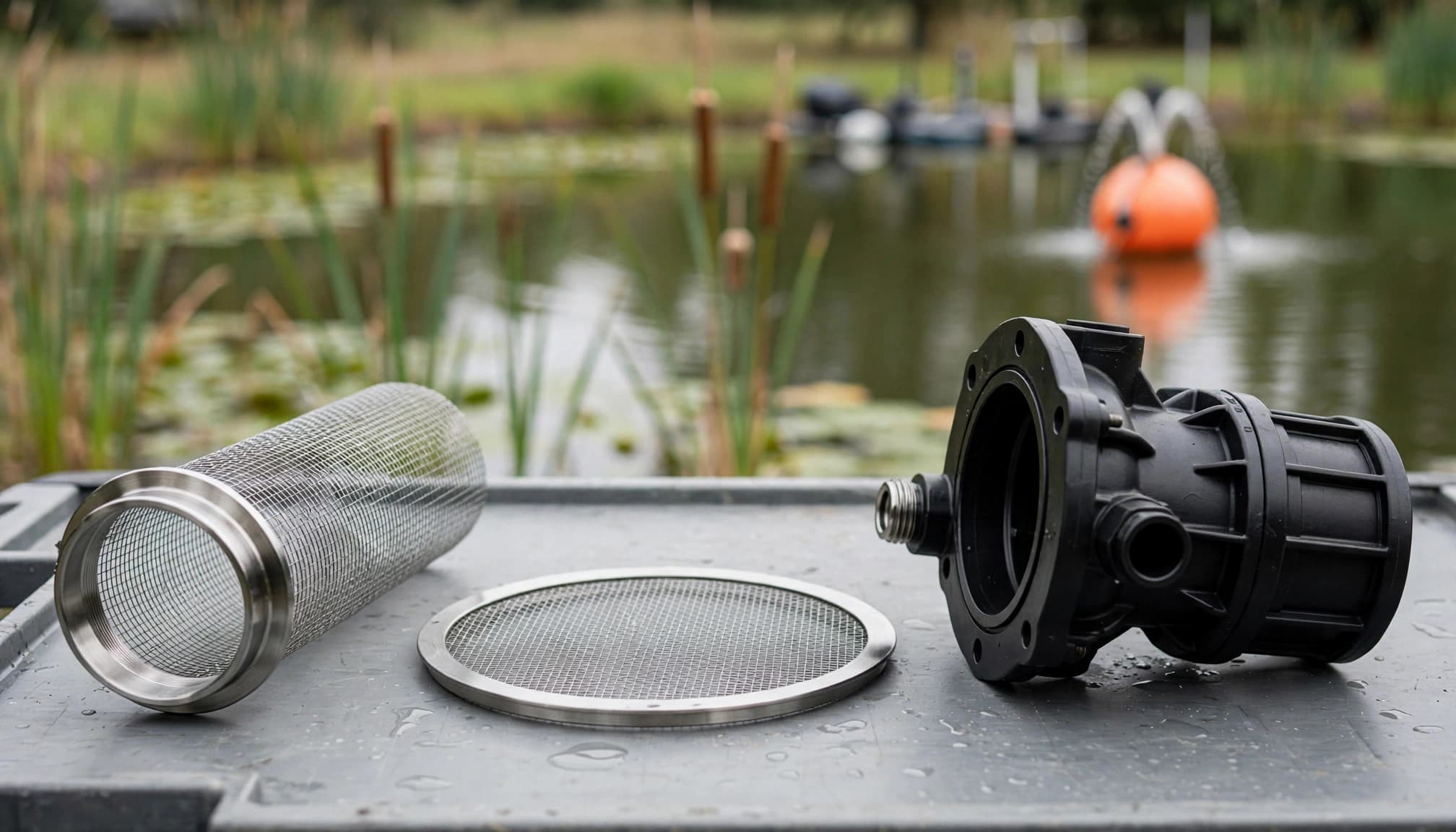
A replacement must match the fountain's pump intake and attachment design. A screen that appears close in size can still leave a gap or block the flow the pump needs.
Confirm the part before ordering
Find the fountain and pump model information in the equipment records or manufacturer's documentation. Use that information to confirm the approved screen with the manufacturer, supplier, or service technician. Check the attachment style and any required rim or sealing components rather than choosing a screen by appearance alone.
Don't substitute improvised mesh or alter a screen to make it fit. Either change can leave debris an entry point or restrict water entering the pump. If the old screen is missing, photographs of the intake housing can help a supplier or technician identify the correct part.
Install it without leaving gaps
Follow the manufacturer's instructions for seating the replacement. Check that its rim contacts the intended mounting surface and that every latch, fastener, or retaining part is in place. Tighten hardware as directed; forcing a fitting can crack a housing or distort the screen.
Before restoring power, gently check that the screen doesn't shift at its attachment points. Look around its full edge for gaps. If it won't sit flat or stay secured, don't start the fountain. Trademark Water Systems offers lake fountain repair and maintenance when replacement or access calls for a technician.
Restart carefully and check the spray
The final check begins before power comes back on. Account for removed tools and debris, make sure the intake screen is firmly secured, and move everyone away from the fountain and water.
Follow the startup instructions
Return the fountain to its normal position and check that lines and cables are where they belong. Then remove the lockout and restore power according to the manufacturer's procedure. Don't run the pump dry or use an unprotected intake as a troubleshooting shortcut.
Watch the initial operation from a safe location. The spray should return to its expected pattern without unusual noise, vibration, or an immediate breaker trip. A stronger spray can support the conclusion that debris caused the restriction, but keep an eye on performance afterward.
Stop if the fault remains
Shut the unit down if flow remains weak, the spray becomes uneven, or the breaker trips. Disconnect and lock out power again before any further inspection. Repeated restarts won't clear a damaged impeller, faulty electrical component, or persistent obstruction.
Record what you saw before and after cleaning. That account helps a technician separate a screen problem from other pump or nozzle issues.
Keep debris from becoming a recurring problem
Inspect the fountain's spray regularly from shore, especially after storms or periods of heavy algae growth. Keep an eye on the water around the float and note when the spray begins to change. There's no single cleaning interval for every lake; conditions and the manufacturer's guidance should set the schedule.
Florida's heat and rain can bring algae and debris back quickly. Add intake checks to broader upkeep rather than waiting for the display to stop. The Florida lake fountain maintenance checklist also covers warning signs such as vibration, shifting anchors, and cable wear.
If the screen clogs soon after every cleaning, document how quickly it happens. A technician can assess the surrounding conditions and equipment without guessing that a different mesh will solve the problem.
Key Takeaways
- Disconnect and lock out power before working near the fountain, pump, or intake.
- Remove debris carefully so it doesn't fall into the pump; clean the screen by a method the manufacturer permits.
- Replace a torn or insecure screen with a compatible part, then check its full edge and attachments before restarting.
- Stop and seek service when cleaning doesn't restore flow or the fountain trips a breaker, vibrates, or makes unusual noise.
Frequently asked questions
Can I clean the screen without removing it?
That depends on the fountain's design and the manufacturer's instructions. You may be able to clear visible debris from an accessible screen, but a full inspection often requires removal. In either case, disconnect and lock out power first. Don't reach into the water or around the pump while the fountain can start.
Should I replace a screen that still lets water through?
Replace it if tears, broken fittings, or a warped rim let debris pass around or through it. Water flow alone doesn't show that the pump is protected. Confirm the replacement against the pump and fountain documentation before ordering.
Why is the spray still weak after cleaning?
The restriction may be elsewhere, including the nozzle or pump intake, or the pump may need repair. Stop the fountain if it sounds rough, vibrates unusually, or trips its breaker. A technician can inspect the full system rather than repeatedly restarting it.
Conclusion
A clean lake fountain intake screen helps water reach the pump, but cleaning only works when the screen remains intact and secure. Check the fit before restarting , and treat persistent flow or electrical problems as reasons to stop.
The safest repair is the one that protects both the pump and the people working near the water.
Latest posts
Read Our Blog
Tips, guides, industry best practices, and news.



Contact us
Get in touch
Our friendly team is ready to chat.